
Pointing Hashrate at a New Pool After a Site Move
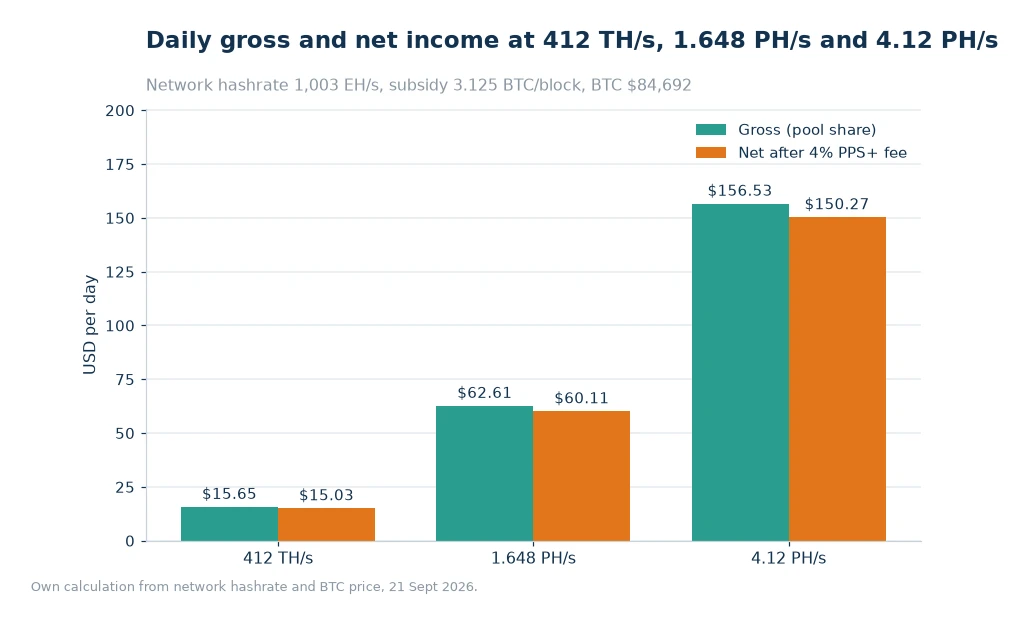
Moving a mining site is mostly a logistics project, but the last step is a redirect, and that step has its own arithmetic. At 412 TH/s the network pays about 0.00018483 BTC a day, or $15.65 gross and $15.03 net after the listed 4% on the block-reward component. Whether the machines sit in the old building or the new one, that daily figure is the same; what changes is how quickly the shares reach the pool.
Key takeaways
- The daily credit at 412 TH/s is $15.65 gross and $15.03 net at BTC $84,692, wherever the hardware is racked.
- Latency shows up as stale shares, not as a lower difficulty, so watch the reject rate for the first week.
- Keep the old worker names for a full difficulty round so the two sites can be compared like for like.
- A 1.648 PH/s group is four 412 TH/s machines, which makes the per-unit check easy after the move.
A move changes latency, not difficulty
The first thing to get straight is what a relocation can and cannot affect. It cannot change the network's total hashrate, the block subsidy or the difficulty that sets your share of the reward. It can change the route between your machines and the pool, the stability of the local power, and the number of shares that arrive too late to count. Those are network and operations issues, not mining arithmetic, and mixing them up leads to false conclusions about the new site.
Latency is the variable worth measuring. A machine that finds a share just before a new block is announced has a short window to submit it. If the path to the pool is slow or congested, that share can arrive late and be counted as stale. The loss is small in percentage terms but persistent, and it compounds over a month. Test the path from the new site before the heavy equipment arrives, using a laptop and the same upstream provider the miners will use. The ViaBTC Mining Pool shows the connection details in the account dashboard, so the rehearsal can use the exact endpoint the machines will point at.
Rebuilding worker names without losing history
Worker names are the part of a move that people regret skipping. If the old site used names like hall-a-01 and the new site starts fresh with worker-01, the pool history splits into two unrelated sets and month-on-month comparison becomes guesswork. A better approach is to keep the machine identifier and add a site prefix, so hall-b-hall-a-01 carries both facts. The naming is ugly; the reporting is clean.
Decide the convention before the first machine is configured, and write it on the rack. A label printer and ten minutes save hours of spreadsheet archaeology. If the fleet is large enough to need it, add the row and the rack position too. The goal is that any single row in the pool dashboard can be traced to a physical slot without opening a ticket.
The first shift after the redirect
The first shift is a test, not a production run. Point one machine at the new pool account and leave the rest on the old one for a few hours. Compare the accepted share rate, the reported hashrate and the credited amount. If the single machine behaves, move a small group, then the rest. This staged approach costs a little administration and catches configuration errors while they are still cheap to fix.
Watch for the obvious failure modes: a worker name that contains a space, a payout address pasted with a trailing character, a firewall rule that allows the old endpoint but not the new one. Each of these looks like a dead machine from the pool side and like a healthy machine from the dashboard. The Statistics view is the quickest way to confirm that the pool is seeing the hashrate you expect from the group you just moved.
Watching variance for a week
After the full fleet is moved, give it a week before drawing conclusions. Daily credits move with difficulty and coin price, and a single quiet day is not evidence of a bad pool. What you are looking for is a trend: accepted shares tracking reported hashrate, no sustained rise in rejects, and a credit line that matches the arithmetic for your total. If one of those three drifts, investigate that one and leave the others alone.
Keep the old account open but idle for the comparison week. The final balance is often settled after the machines have stopped, and closing too early can strand a small amount. Withdraw the balance, confirm the address, and then leave the account dormant until the comparison is finished. A clean break is easier to audit than a tangle of partial withdrawals.
The table below converts the three hashrate tiers into hourly, daily and monthly net values, which is the format most useful when comparing two sites on the same fee schedule.
| Hashrate | Net per hour | Net per day | Net per 30 days |
|---|---|---|---|
| 412 TH/s | $0.63 | $15.03 | $450.90 |
| 1.648 PH/s | $2.50 | $60.11 | $1,803.30 |
| 4.12 PH/s | $6.26 | $150.27 | $4,508.10 |
What to keep from the old account
Export the old statements before you leave. A year of daily credits is useful for tax, for warranty discussions and for any later argument about uptime. Most dashboards offer a CSV or a date-range view; take both if they exist. Store the export with the site's power records, because the two together tell the full story of what the machines earned and what they cost.
Also keep the old payout address in your records even after you stop using it. If a final settlement arrives later, you will want to recognise the source immediately. Label the file with the dates the account was active and the reason for the move. Future you, or an accountant, will not remember which address belonged to which year.
When the new site is worse, not better
Sometimes the move does not work out. Power may be less stable, the local network may be congested, or the building may run hotter than the old one. A reject rate that stays elevated after a week, or a hashrate that sags in the afternoon, is a signal to investigate before blaming the pool. Compare the machine's inlet temperature at both sites; heat is the most common reason a fleet underperforms after a move.
If the problem is the site, the pool account is the easy part to keep. Your worker names, payout address and history all travel with the account, so returning the machines to the old building does not require rebuilding anything. That portability is worth confirming before the move, and it is one reason to keep the account details in a shared password store rather than on one person's laptop.
Worked example
Start from a per-petahash figure and scale down to the single-machine case.
- One petahash is 1,000 TH/s, and 450 BTC ÷ 1,003,100,000 TH/s × 1,000 = 0.00044861 BTC a day per PH/s.
- 412 TH/s is 0.412 PH/s, so 0.412 × 0.00044861 = 0.00018483 BTC.
- At $84,692 that is 0.00018483 × 84,692 = $15.65 gross.
- The listed 4% on the block-reward component removes $0.63, leaving $15.03.
- 1.648 PH/s: 1.648 × 0.00044861 = 0.00073931 BTC, or $62.61 gross and $60.11 net.
- 4.12 PH/s: 4.12 × 0.00044861 = 0.00184827 BTC, or $156.53 gross and $150.27 net.
- Four machines of 412 TH/s make 1.648 PH/s exactly, so the group total can be checked against the single-unit figure by multiplication.
Frequently asked questions
Does moving site change my daily payout?
Not through the pool arithmetic. The credit depends on hashrate, difficulty and the fee schedule, so 412 TH/s earns the same gross figure at either site unless uptime or stale shares change.
How long should I test before moving the whole fleet?
Run one machine for a few hours, then a small group for a day, then the rest; a full week of normal operation after that is enough to see whether rejects or temperatures have shifted.
Should I close the old account immediately?
No. Leave it open until the final balance settles and you have exported the statements, then withdraw the remainder and keep the records; closing early can strand a small late credit.
Run the redirect for a full difficulty round
A difficulty round is the natural unit for judging a move, because it is the period over which your share of the network is priced. Keep both accounts visible for that window, compare the credits, and only then retire the old bookmarks. If the numbers agree, the move is done. If they do not, the difference will point to uptime, heat or latency, and each of those has a fix that is cheaper than moving again. Set up the phone app to alert on missing workers so a silent machine is noticed the same day.
Sources: ViaBTC statistics, pricing and app pages for monitoring tools and the component rates. Readings taken 21 Sept 2026: network hashrate 1,003 EH/s, difficulty 132.76 T, 3.125 BTC per block, 144 blocks a day, BTC at $84,692. Published 24 Oct 2026; the dollar columns assume zero downtime and leave power out[1].